No Flash Player Detected

See us at the
Recording Show Logo
Recording Show 2008
May 10 - 11, 2008
SAE Institute
Milan, Italy

ADA-8XR Options and Configurations


The ADA-8XR is a modular system and this provides great flexibility when creating systems with larger numbers of channels. Whether you need just a few channels of high-quality conversion or large a multi-track setup, the ADA-8XR is the natural choice. Using combinations of the basic system options and the range of digital interfaces you can build the system that perfectly matches your requirements.

The basic chassis has space for two analogue modules and two digital modules. Each module provides connections for 8 channels of audio. The analogue slots can hold either input cards containing 8 channels of Analogue to Digital conversion or output cards containing 8 channels of Digital to Analogue conversion. This means an ADA-8 can be configured as a 16 channel AD converter, a 16 channel DA converter or an 8 channel AD/DA converter. It is not necessary to fill both the analogue module slots so an 8 channel AD or DA converter is also possible.

Digital modules are available for interfacing to a variety of formats from AES/EBU and FireWire to Pro Tools HD. Each of these modules is a bi-directional 8 channel I/O module so for 16 channel AD or DA configurations two modules will be required. In addition, the FireWire module is 8 channel capable at 24 bit, 96kHz, but there are bandwidth restrictions that limit the number of channels that can be handled above this. Please see the FireWire module specifications for further details.

Configuration examples

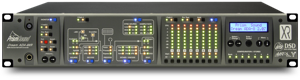
EXAMPLE SYSTEM 1
A single-unit solution providing 8-channel Analogue I/O for Nuendo, Sound Track Pro or Logic Pro with additional AES I/O:

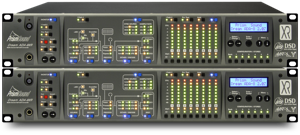
EXAMPLE SYSTEM 2
A two-unit solution providing 24 analogue output channels, 8 Analogue input channels for Nuendo, Sound Track Pro or Logic Pro with additional 4 x (stereo) AES I/O:

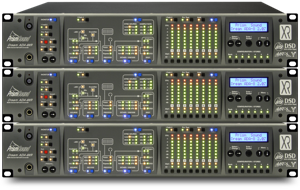
EXAMPLE SYSTEM 3
A three-unit solution providing 32 analogue output channels, 16 Analogue input channels for Pro Tools HD with additional 4 x (stereo) AES I/O:
Configuring your ADA-8XR
Selecting the ADA-8XR configuration to suit your application is very straightforward.

Step 1: Base configuration. Consider the total number of analogue input and output channels needed. This will be the main factor that dictates the number of units required. If the number of input and output channels will be equal, simply divide the total by 8 and the result is the number of units required.

If the number of channels is unequal, consider using 16-channel units for whichever direction requires the larger number of channels. Several examples are illustrated above. In general, preference should be given to "8 AD + 8 DA" configurations as these will be less expensive. For example, if 16 channels of analogue input and analogue output are required the most cost effective and flexible configuration is 2 standard "8 AD + 8 DA" units rather than one "16 AD" and one "16 DA".

Note that D-D configurations can also be created where no analogue cards are fitted.

Step 2: Choose the digital I/O modules. There are two slots for digital interface modules and any two can be selected. Note that when using 16-channel configurations, the digital interface will generally need to be duplicated for each block of 8 analogue channels - for example: a 16 x DA configuration would require two Pro Tools interfaces, or two FireWire cards, or two AES cards to provide all 16 channels to the desired digital output format.

ADA-8XR Base configurations

The 8-in & 8-out configurations can support 2 different Digital Interface modules. 16 channel configurations require 2 of the same interface card type to provide the requisite number of channels. Digital only configurations can be constructed, for example a FireWire to AES breakout.

ADA-8XR Back Panel

ADA-8XR rear panel


The rear panel of the ADA-8XR is arranged as follows: To the right of the mains inlet are two large Module Slots for Analogue I/O Modules. To the right of these are two small Module Slots for Digital I/O Modules. On the extreme right-hand side is the Utility Module, which contains a variety of input and output connectors for Reference Sync, analogue and digital Monitor, and serial communications.

ADA-8XR Digital Interface Modules

ADA-8XR and Pro Tools

The ADA-8XR can be configured to optimally use the I/O on the Digidesign Core or Process card. ADA-8XR interface modules can be configured EITHER so that each interface module appears as a single 192IO-type device OR cascaded so that a pair emulate a single 192IO. In this way, up to four ADA-8XR units can be connected to a single core/process card, appearing as 192IO units, but using all the available IO slots. For example, four units configured as 8AD and 8DA with Pro Tools and AES interfaces would provide 32 channels of analogue I/O PLUS AES digital I/O on ALL CHANNELS. The ADA-8XR supports loop sync, but can also be clocked in a variety of other ways including master or slave. The ADA-8XR is ideal as a synchronization reference in Pro Tools or other systems.

ADA-8XR and FireWire

The ADA-8XR can interface to a PC running Windows XP or to a MAC running OS X 10.3.8 or later using FireWire (IEEE1394). To obtain more channels, several interfaces may be cascaded on the FireWire bus. When using 16-channel configurations, two FireWire interface modules are required. The ADA-8XR uses an ASIO driver for XP compatibility, provided by Prism Sound. The ADA-8XR can lock to the FireWire interface of the host computer, or run from its own precision reference or lock to an external clock source such as AES3/11 or wordclock. The ADA-8XR is ideal as a synchronization reference.

ADA-8XR Firmware

The ADA-8XR is modular in respect of both its hardware and software. Throughout the life of the product, new software features and support for new hardware options will continue to be added through firmware updates which are distributed on disk and via this web site.

An advantage of the modular construction of the ADA-8XR is that future improvements in technology can be incorporated; for example new A/D converter devices, D/A converter devices, DSP chips, digital I/O standards can all be accommodated by replacing only the relevant Module.

The ADA-8XR firmware can be installed from a Windows PC with an RS232 serial port. The firmware for the FireWire card is updateable separately from a Windows XP PC with a FireWire port.

See ADA-XR Downloads to download the latest firmware.

An overview of the available modules is given on the ADA-XR Modules page. For more detailed descriptions of these modules, see the module reference available from the the ADA-8XR downloads page.

More Links:
Firmware Download - available from the ADA-8XR downloads page
Download Manuals - available from the ADA-8XR downloads page
Information on modules - more information on the available ADA-8XR modules
Technical Specifications - analogue modules - ADA-8XR analogue module tech specs
Technical Specifications - digital modules - ADA-8XR digital module tech specs


Trademark acknowledgements
Digidesign, Pro Tools, Pro Tools 24|MIX, 888|24 I/O, Pro Tools|HD, 192 I/O, 96 I/O, SYNC I/O and DigiLink are trademarks of Digidesign, a division of Avid Technology Inc.
TOSLINK is a trademark of the Toshiba Corporation
Direct Stream Digital, DSD, MAC-DSD, SuperMAC and the DSD logo are trademarks of Sony Corporation.
Super Audio CD, SACD and the SACD logo are joint trademarks of Sony Corporation and Philips Electronics N.V
Microsoft and Windows are trademarks of Microsoft Corporation.
Apple, Macintosh, Core Audio, FireWire and OS X are trademarks of Apple Computer, Inc.
Sonic and HDSP are trademarks of Sonic Inc.

All trademarks acknowledged