

FM Multiplex with RDS on dScope
Linked Resources:
The ability to generate an FM Multiplex (MPX) for stereo FM radio
reception testing is made possible by the extended audio bandwidth of
the dScope Series III audio analyzer.
This application note is an
introduction to the process of creating an FM multiplex that enables
the dScope to test FM stereo radio reception with the simple addition
of an FM exciter. The inclusion of an RDS (Radio Data System)
subcarrier allows the dScope to facilitate the testing of simple RDS
functionality.
| APPLICATION NOTES |
 Audio Multi-tone testing techniques Audio Multi-tone testing techniques |
  FM stereo multiplex (MPX) with RDS testing Notes FM stereo multiplex (MPX) with RDS testing Notes |
| SCRIPTS AND AUTOMATION |
| FM stereo multiplex with RDS test script |
| RELEVANT PRODUCTS |
| dScope Series IIIA+ |
| dScope Series III |
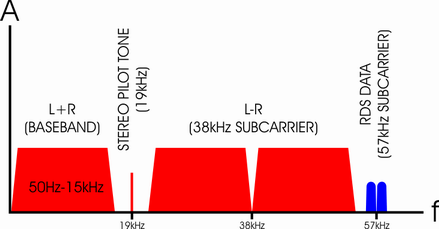
Prism Sound's dScope III audio analyzer has long been a test and measurement tool of choice with car audio manufacturers. In addition to the already feature-rich software within dScope for testing analogue and digital audio devices, this FM Stereo multiplex test script has been designed specifically to extend the spread of tests that can be conducted with one piece of test equipment, cutting the cost for production testing. The script enables test engineers to generate stereo FM signals and to send RDS data via an FM exciter to the device under test. The audio performance can be verified by the dScope automatically. The Visual Basic script generates a multi-tone stimulus encoded as an FM stereo multiplex (MPX) signal, enabling ultra-fast simultaneous measurement of signal level, distortion, signal-to-noise-ratio, frequency response and crosstalk at the output of the receiver under test.
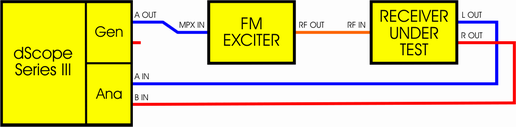
In addition, an RDS sub-carrier can be included in the MPX, carrying basic information such as 'Program Service Name' for RDS decoder testing. The RDS reception can be checked on the devices RDS display.
The script can be modified by the user to customise test frequencies, RDS content etc. See the box at the top right of this page for the files to download etc.
For more information please contact us using the form below:
App ID: 0010, Resource ID: 81